
BadshahCric Login
Sign in with your mobile number
100% Secure Connection · Fast login
- Login Method
- Username and password
- Password required?
- Yes
- App available
- Android APK Available
- iOS Login
- Use mobile browser
How to Login?
- 1
Visit official website
Find the Login Button
Start by looking at the top right corner of your screen. You will see a red button labeled Login.
Click the Login Button
Tap on that Login button to open up the sign-in form.
Enter Your Details
In the form that appears, type in your registered username or mobile number and your password.
Complete the Login
After filling in your information, tap the confirm or login button to access your account.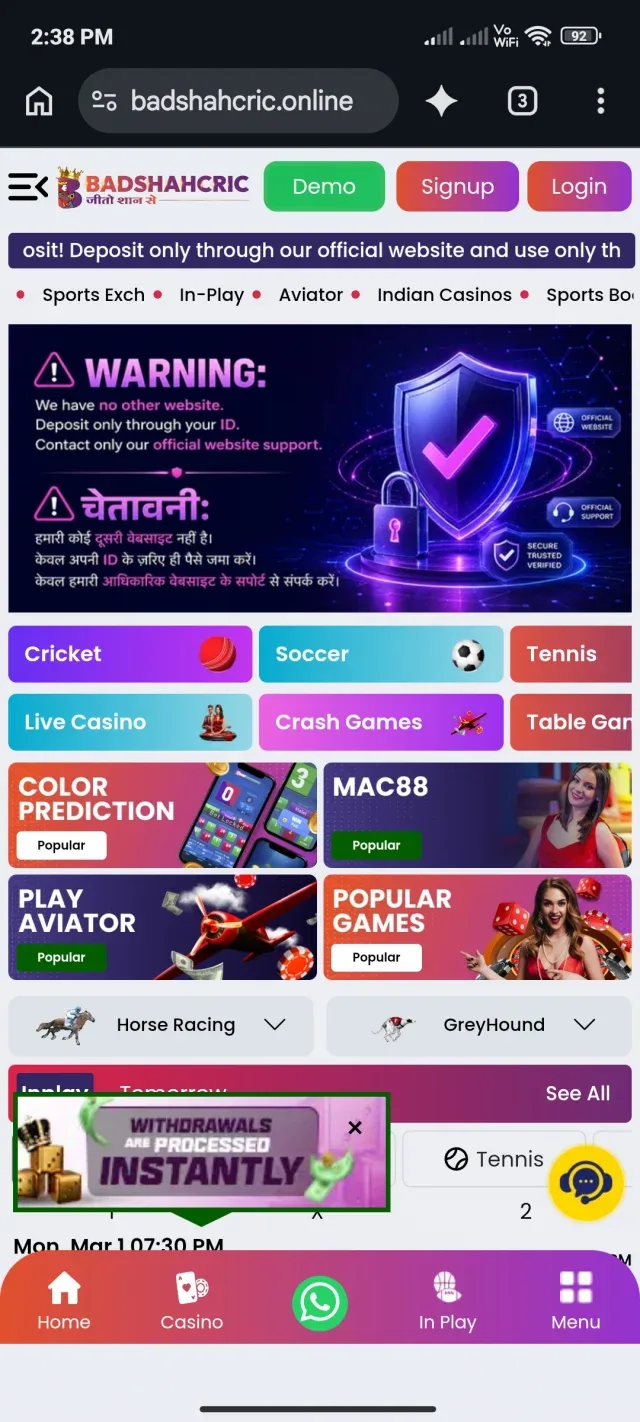
- 2
Enter your information to login
Find the Input Fields: In the center login popup box, look for the first text box labeled "Username".
Enter Your Username: Tap into the Username field and type in your registered account username.
Enter Your Password: Right below it, locate the "Password" field and type your account password.
Accept Terms & Conditions: Make sure the checkbox next to "I accept all the Terms & Conditions" is checked.
Submit the Login: Tap the purple "Login" button located below the terms checkbox to finish signing in.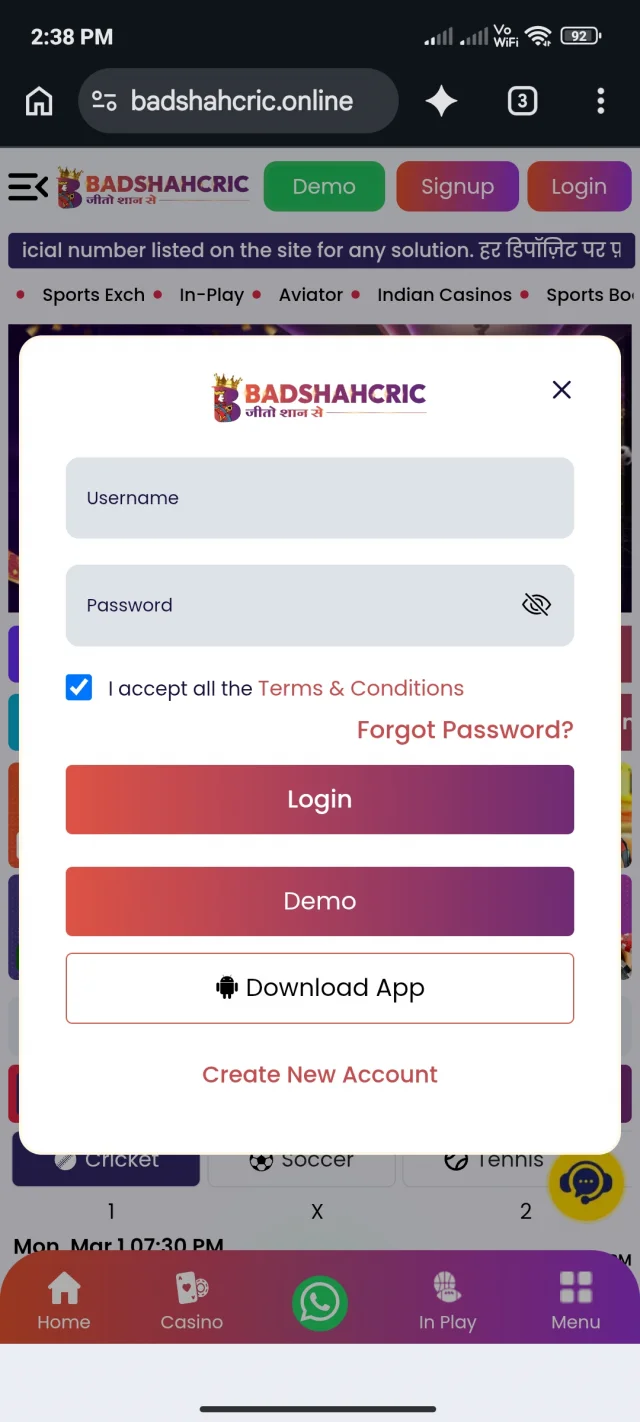
- 3
After login you may get pop ups on your screen
Review the Popup Message: The screen is showing a notification that says "Looks Like Your Balance Is Too Low" and prompts you to "Deposit Balance To Continue Playing".
Choose an Option: You have two buttons on the pop-up box.
Tap the red "Cancel" button if you want to close this message and go back to browsing the main screen.
Tap the yellow "Deposit" button if you want to add funds to your account so you can continue playing.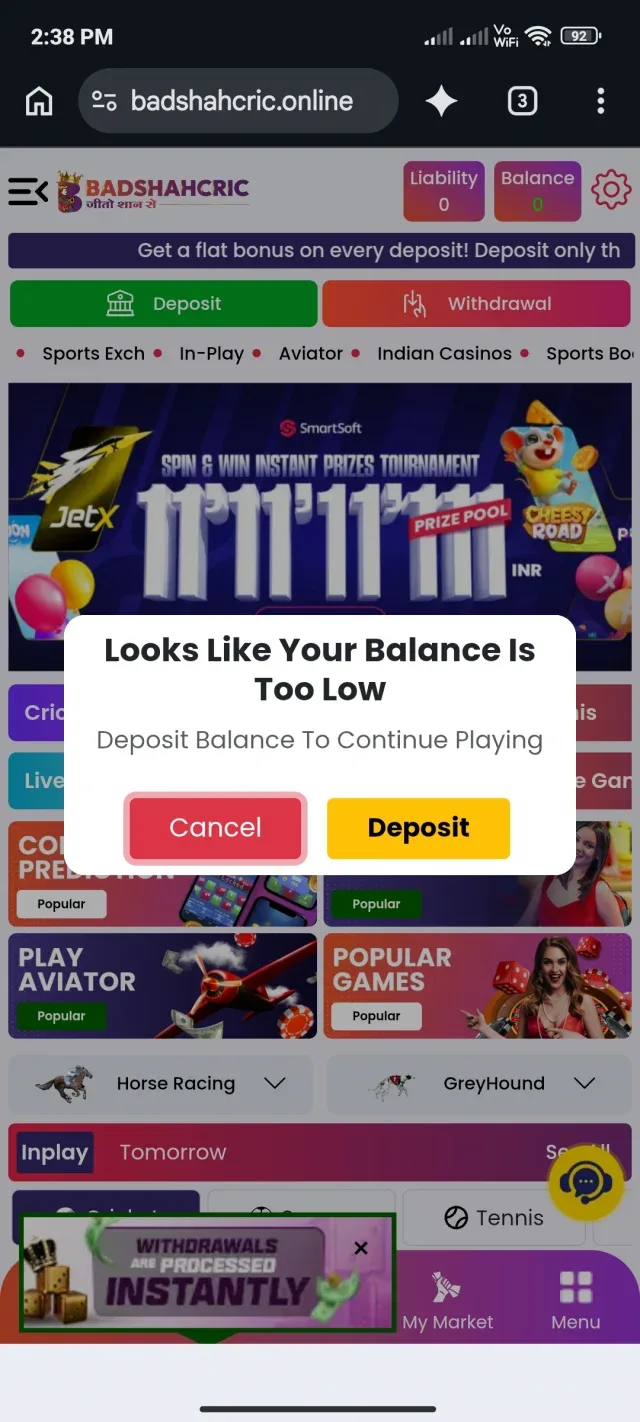
- 4
Main dashboard panel
View Account Balances: At the top right corner of the screen, you can see your current Liability and Balance information boxes.
Manage Funds: Below the top banner, you will find a green Deposit button and a red Withdrawal button to handle your money.
Explore Categories: You can select from various gaming and sports categories listed on the screen, such as Cricket, Soccer, Tennis, Live Casino, Crash Games, and Color Prediction.
Use Bottom Navigation: Use the menu bar at the very bottom of the screen to quickly switch between Home, Casino, WhatsApp support, My Market, and the main Menu.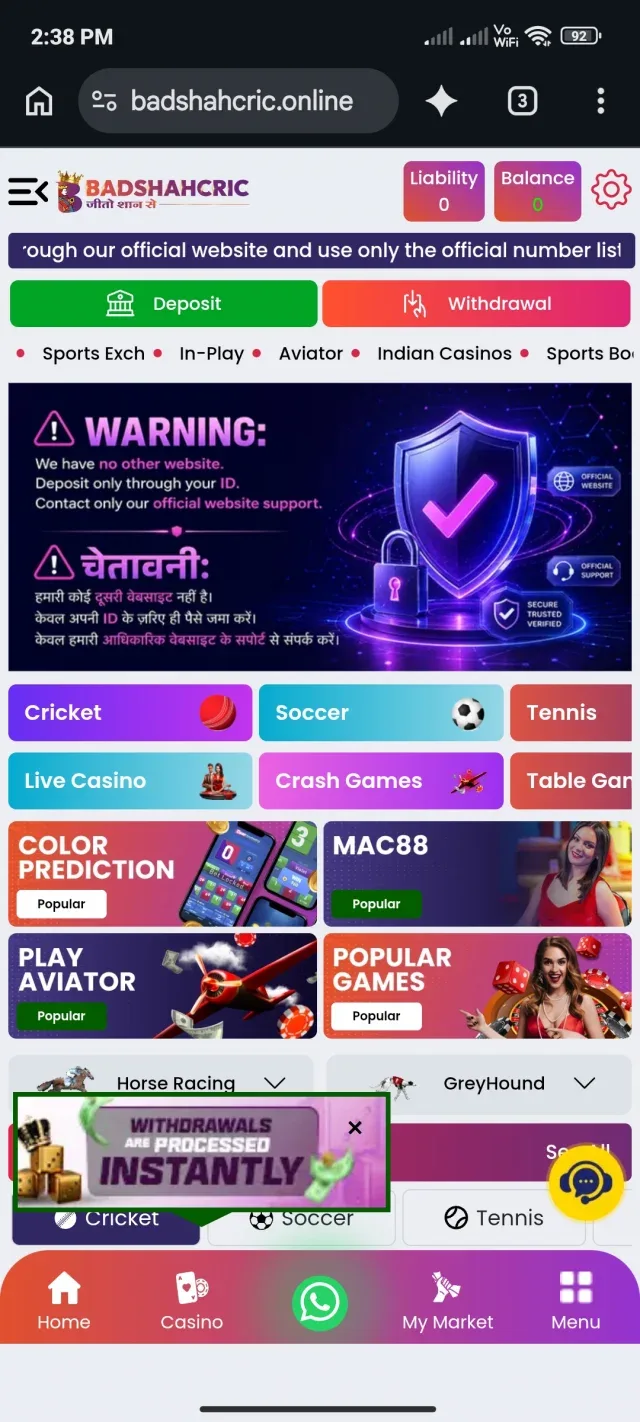
- 5
How to deposit on website
Enter or Select an Amount: In the Amount field at the top, type the specific amount you wish to deposit, or tap one of the quick-add preset buttons below it (such as +500, +1000, +2000, +5000, etc.) to automatically fill the field.
Submit the Deposit: Once you have entered your desired amount, tap the purple Submit button near the bottom of the form to proceed.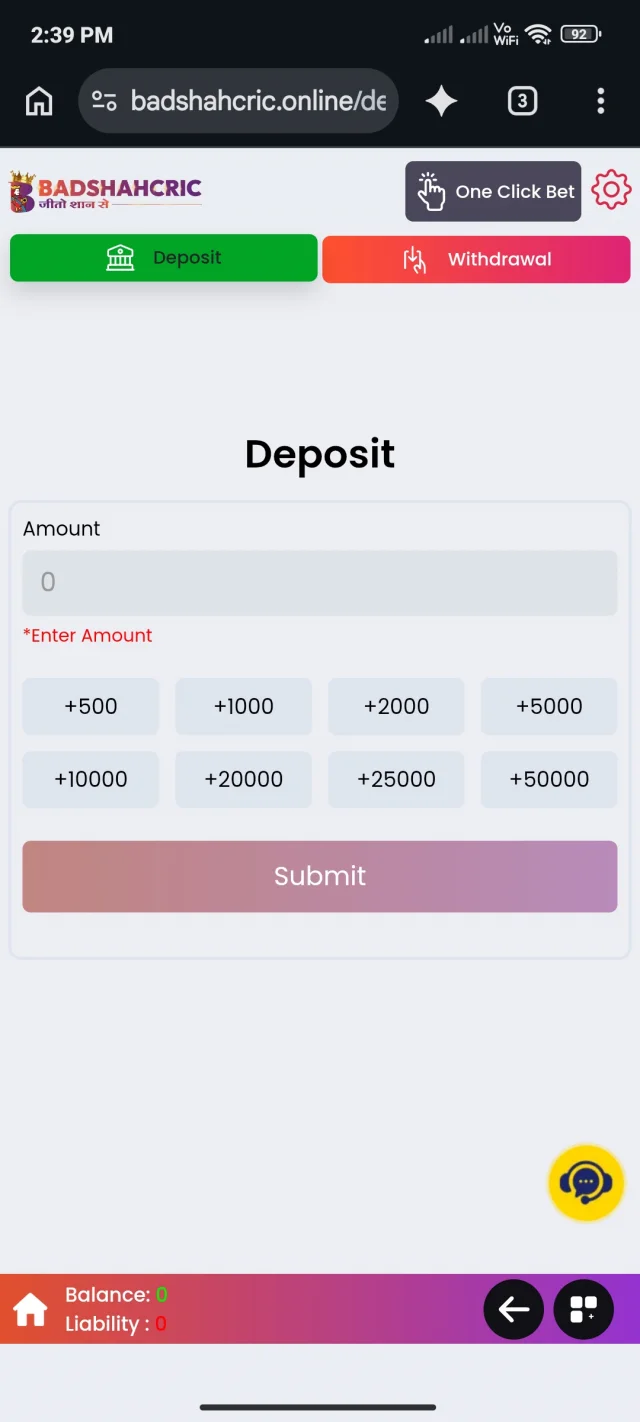
- 6
How to withdraw the winning amount
Review the Alert Message: Notice the red notification banner at the top that says "Please create a bank account first", which means you need to link your bank details before proceeding.
Select the Add Account Option: Make sure the Add Account tab is highlighted in purple/red below the instructions.
Fill in Account Information:
Enter your account details in the Account field.
Type your full name into the Holder Name box.
Enter your Bank Name in the corresponding field further down.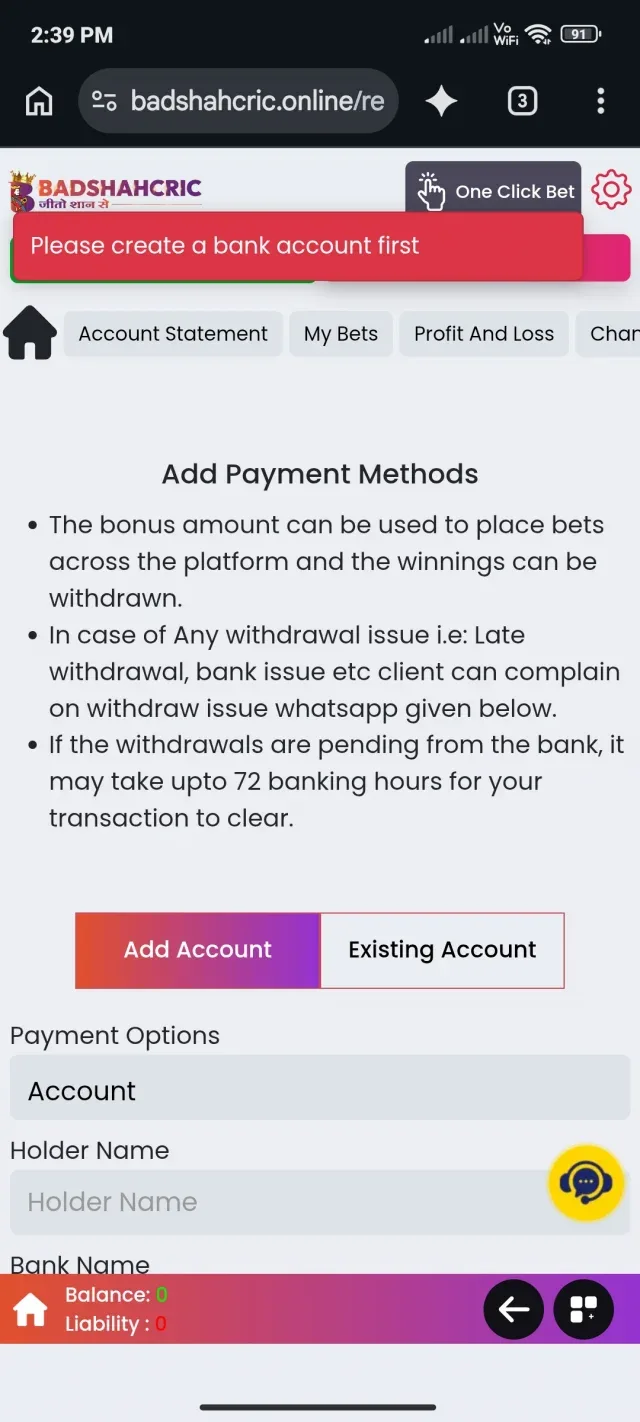
- 7
Disclaimer
Platform Nature: BadshahCric is an online gaming and betting website. Please note that participation in online gambling and betting involves financial risk and may be subject to legal restrictions depending on your jurisdiction.
Financial Transactions: All deposits, withdrawals, and account balances should be managed carefully. Ensure you use official website channels for any transactions and protect your login credentials.[Screenshot: Disclaimer]
Common Questions
How do I log in to my account?
How do I log in to my account?
Click the Login button at the top right of the homepage. Enter your username and password in the popup box, check the terms and conditions box, and tap the purple Login button.
What should I do if my balance is too low?
What should I do if my balance is too low?
If a pop-up appears stating your balance is too low to continue playing, you can tap the yellow Deposit button to add funds or tap Cancel to return to the main screen.
How do I deposit money into my account?
How do I deposit money into my account?
Go to the deposit section, enter your desired amount or select one of the quick-add preset buttons (such as +500 or +1000), and tap the Submit button.
Why am I seeing a message saying "Please create a bank account first"?
Why am I seeing a message saying "Please create a bank account first"?
This error appears when the system requires you to link your banking details before you can process certain transactions. You will need to fill out your account details, holder name, and bank name under the Add Account section.
Where can I check my current balance and financial liability?
Where can I check my current balance and financial liability?
Your current balance and liability details are displayed in boxes at the top right corner of the dashboard screen.